The latest version of this document can be found at www.broad.ology.org.uk/amiga/proaction/index.html
ProAction 1.8 - A New GUI System For Scripting Under AmigaOS (SVN: 1:32M)
Download From OS4Depot
Who? What? Why?
Who?
ProAction. It's a bit of a bad pun on the name of the GUI toolkit this system supports.
Reaction.
What?
ProAction. Is basically an ARexx host, there are many about, this one is designed to provide GUI's for scripts
(or even full programs!). The difference with ProAction is that whilst the script is
sending commands to the ProAction server, the server is sending a separate stream of commands
to the scripts own ARexx port.
It can be used by any scripting language that can both send ARexx commands and implment it's
own ARexx port. So that might mean Python using the arexx module thatcomes with the official AmigaOS version, perl using the arexx module
from perl_Reaction (Hmmmm....)
or even ARexx! (using rexxsupport.library).
Why?
Whilst working on SketchBlock I had been writing many support scripts both in ARexx and Python. To get user input I was using commands like RequestChoice and RequestString typically found in the C: directory, but this was very limiting. I needed real GUI elements!
There hasn't been any native solution for GUI's for scripts under AmigaOS 4.x. There was AWNPIPE: for AmigaOS 3.x but it's hasn't been updated for OS 4 and is not 100% stable, plus it didn't use standard names for the attributes, which meant cross referenceing against the Reaction / BOOPSI autodocs difficult.
So out of that need ProAction is born!.
How?
To start a session with ProAction the script sends the CREATEGUI command to ProAction including with it the name of the scripts own ARexx port. ProAction returns an ID number for the created GUI and this needs to be saved and used with all further communications with the server.
The GUI is built up
and manipulated using TagLists, in a very similar way to a C program. There is a set of ARexx commands with direct pararells to the Intution BOOPSI commands used when programming in C.
Taglists are passed in one of two ways. All commands that accept Tags accept both TAGSTEM and TAGSTRING arguments (but not both at the same time!).
-
TAGSTEM:
A stem variable eg.
	 STEM.0 = 20 /* Number of tags */
	 STEM.1.TAGNAME = "WA_Left" /* tag name case sensitive! */
	 STEM.1.TAGVALUE = 40       /* value of the tag format depends on the type of info */
	 ....
	 ....
	 STEM.20.TAGNAME = "WA_IDCMPFlags"
	 STEM.20.TAGVALUE = "IDCMP_MouseMove | IDCMP_MenuVerify ..." /* Many constants can be entered as string
	                                                               that are direct equivalents of those
	                                                                 defined in the AmigaoS SDK */
-
TAGSTRING:
Tags expressed as a string, in a manner similar to varargs in C functions.
"WA_Left,40,WA_Top,40,TAG_DONE"
The tagstring tags and values are sepaerated by commans ',' and no white space. The string must end with TAG_DONE.
Supported Gadget and Image Classes
Support for the following gadgets and images has been added:
Example Scripts
The best way to explain quickly is to do it by example so here are some example scripts:
| Script: | Language | Notes: | Screenshot |
| PAHello |
ARexx |
A simple and elegant "Hello World" for ProAction written by Niels Bache and used by kind permission.
The code is commented. It provides examples of setting up the GUI, then of querying and setting gadget attributes.
|

|
| PAFindTag |
Python |
Requires ProAction 1.3 or greater.
The code is commented. It provides examples of setting up the GUI, then of querying and setting gadget attributes.
|

|
| RadioButton |
Python |
Requires ProAction 1.3 or greater.
A Simple GUI, written in arexx to demostrate the use of the ALLOCRADIOBUTTONNODE and FREERADIOBUTTONNODE functions, as well as the list support functions such as ADDTAIL REMTAIL etc.
The code is commented. It provides examples of setting up the GUI.
|

|
| ProActionControl |
Python |
Requires ProAction 1.3 or greater.
This small GUI allows you to adjust the debug level of ProAction in realtime, without resorting to manually sending Rexx commands from the shell (as I have been during developement :-)).
The code is commented. It provides examples of setting up the GUI, then of querying and setting gadget attributes, and building new arrexx commands from the queried values.
It also shows examples Of using GA_HintInfo, to display gadget help messages.
|

|
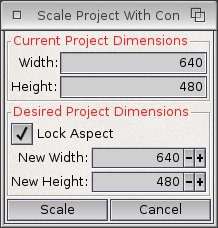
| Scale Project |
ARexx |
This is the new "Scale Image" script for SketchBlock 1.7 it will work with 1.6 though if you want to try it out. Just replace SketchBlock:Rexx/ScaleProjectWithContents.rexx with the provided script.
The code is commented. It provides examples of setting up the GUI, then of query gadget attributes (the integer gadgets) to get the result of the user input.
|
|
| ExportAs |
Python |
Another example from SketchBlock this is an updated export script that uses a Chooser Gadget rather than a radio button gadget.
The code is commented. It provides examples of setting up the GUI, build node lists and then of query gadget attributes (chooser node etc.) to get the result of the user input.
|

|
NB: the examples above use APPDIR: to start proaction if it's not allready running, so please run it at least once after installing and before testing the examples!.
ProAction Server Arexx Commands
The ProAction arexx port name is PROACTION, the port you provide for you script may be any available name you choose.
General Commands
HELP
COMMAND/K
Get some help about the commands available.
- NO ARGS
- List all commands
- COMMAND/K
- Return the ReadArgs style template for the specified command
QUIT
FORCE/S
Causes the main ProAction host to quit. ProAction will close down all active GUIs, cleanup resources and exit.
This probably shouldn't be done by a normal script as there is no way to know whether other scripts are using ProAction.
It could be useful to cleanup however if a client script has failed and left a GUI window open...
- FORCE/S
DEBUG
ProAction can be asked to output debug info on taglists generated, Tags processed, objects created etc.
This can be useful not only as debuging tool for ProAction but also for your GUI script.
It will highlight unrecognised Tags and any unsupported value types etc.
LEVEL/N/K/A,DELAY/N/K,SERIAL
- LEVEL/N/K/A
- Set the current debug level, the higher the level the more output.
- DELAY/N/K
- Introduce a delay after each debug printout. This can help see whats really a happening and when in relation to the GUI activity. The delay is measured in "ticks", there are 50 ticks per second.
- SERIAL/S
- If this switch is set, debug output is sent to the serial port using IExec->DebugPrintF() otherwise it's printed to STDOUT using IDOS->Printf().
STARTMACRORECORD
MACROFILE,TIME/S,PYTHON/S,IN/S,OUT/S
Record all commands sent and or received by ProAction to a macro file.
This is a primarialy intended as a powerful debugging feature.
- MACROFILE
- File to save data to.
- TIME/S
- Add timestamps to the saved data
- PYTHON/S
- Save data in python style code rather than ARexx
- IN/S
- Record incoming commands
- OUT/S
- Record out going commands.
Result
STOPMACRORECORD
End recording a macro.
Result
GUI Initilisation and Finalisation
CREATEGUI
PORTNAME/K/A,TAGSTEM/K,TAGSTRING/K
Intialise a new GUI and pass back a "key" to reference it by. This key will need to be used in all subsequent commands sent to ProAction. It will also be sent in all messages ent by ProAction to the script, enabling script to handle multiple GUIs if required.
The initilised GUI will have an "embeded" window.class BOOPSI object. The tags passed via either TAGSTEM ot TAGSTRING are passed to this at OM_NEW.
- PORTNAME/K/A
- The name of the scripts ARexx port, this port will receive commands from the ProAction server, once the GUI has been initiaised.
- TAGSTEM/K
- Tags to initialise the window.class object passed via a STEMVAR
- TAGSTRING/K
- Tags to initialise the window.class object passed as a string
Result
If succesful RC is set to 0 and the access key to the created GUI is placed in RESULT.
DESTROYGUI
GUIID/K/N/A
Dispose of the GUI. Close any open windows, free all resources, the key is no longer valid.
- GUIID/K/N/A
- The key of the GUI to dispose of.
Window Control
OPENGUIWINDOW
GUIID/K/N/A
Invoke WM_OPEN on the embeded window.class object. This should be called once the the script has finished buiding the GUI,
- GUIID/K/N/A
- GUI key returned by CREATEGUI
CLOSEGUIWINDOW
GUIID/K/N/A
Invoke WM_CLOSE and close the window.
- GUIID/K/N/A
- GUI key returned by CREATEGUI
RETHINKGUIWINDOW
GUIID/K/N/A
Relayout and redraw the windows gadgets. Call tis after you have modified the GUI is some way.
- GUIID/K/N/A
- Gui key returned by CREATEGUI
Result
The GUI is refreshed.
GUI Building, Gadget Creation etc.
ADDLAYOUT
GUIID/K/N/A,TAGSTEM/K,TAGSTRING/K
Add a new layout gadget to the current layout gadget or if it's the first one to the window.class object. See the layout.gadget autodoc for more information.
All subsequent ADDGADGET and ADDIMAGE calls will add to this layout, until ENDLAYOUT is called or until another level of layout is created with anew call to ADDLAYOUT.
- GUIID/K/N/A
- GUI key returned by CREATEGUI
- TAGSTEM/K
- Tags to pass to the new layout gadget.
- TAGSTRING/K
- Tags to pass to the new layout gadget.
Result
If successful a key to the layout gadget is returned in RESULT. This may be used to reference the gadget in calls to SETATTRS etc.
ENDLAYOUT
GUIID/K/N/A
Stop adding objects to the current layout gadget and resume adding to it's parent layout.
- GUIID/K/N/A
- GUI key returned by CREATEGUI
Result
The key of the now newly current layout is returned in RESULT, that is the key to the parent of the layout just ended. If the layout ended was the root layout this will be 0.
NB: If the result is 0, and a new layout is added wuth ADDLAYOUT then it will replace the tree just added and start a new layout tree. This probably isn't what you want!
ADDGADGET
GUIID/K/N/A,GADGETCLASS/K/A,TAGSTEM/K,TAGSTRING/K
Create a new gadget object and add it to the current layout. Any public gadget class may be added. The tags provided here are passed at OM_NEW.
- GUIID/K/N/A
- GUI key
- GADGETCLASS/K/A
- The name of the public gadget call eg "button.gadget"
- TAGSTEM/K
- Tags to pass at OM_NEW
- TAGSTRING/K
- tags to pass at OM_NEW
Result
The key to reference this gagdet by is placed in RESULT. This key is also used as the gadget id set by GA_ID. So avoid setting GA_ID yourself ( as you might normally do when coding in C).
ADDIMAGE
GUIID/K/N/A,IMAGECLASS/K/A,TAGSTEM/K,TAGSTRING/K
Similar to the above but for an Image rather than a Gadget.
- GUIID/K/N/A
- GUI key
- IMAGECLASS/K/A
- The public name of the image class eg"bitmap.image"
- TAGSTEM/K
- Tags passed at OM_NEW
- TAGSTRING/K
- Tags passed at OM_NEW
Result
The key to reference this image by is placed in RESULT.
NEWGADGET
GUIID/K/N/A,GADGETCLASS/K/A,TAGSTEM/K,TAGSTRING/K,DISPOSE/S
Creates a new gadget but does not add it to any layout. This allows greater control on how the gadget is used.
- GUIID/K/N/A
- GUI key
- GADGETCLASS/K/A
- Public name of the gadget class egstring.gadget
- TAGSTEM/K
- Tags to pass at OM_NEW
- TAGSTRING/K
- Tags to pass at OM_NEW
- DISPOSE/S
- Set this flag if you wish ProAction to handle disposing of the gadget at cleanup time. BY default gadgets are not disposed of by ProAction as they are typically autodisposed of by the layout gadget they belong to.
Result
The key to reference this gagdet by is placed in RESULT. This key is also used as the gadget id set by GA_ID. So avoid setting GA_ID yourself ( as you might normally do when coding in C).
NEWIMAGE
GUIID/K/N/A,IMAGECLASS/K/A,TAGSTEM/K,TAGSTRING/K,NODISPOSE/S
Again similar to the above but for an image class object.
- GUIID/K/N/A
- GUI Key
- IMAGECLASS/K/A
- Public name of the image class required egbevel.image
- TAGSTEM/K
- Tags to pass at OM_NEW
- TAGSTRING/K
- Tags to pass at OM_NEW
- NODISPOSE/S
- Set this if you DO NOT want this image diposed of by ProAction. The default behaviour is the opposite of that for gadgets.
DISPOSEOBJECT
GUIID/K/N/A,OBJECTID/K/N/A
Dispose of the referenced object. This includes but is not limited BOOPSI objects, such as Gadgets and Images. Once disposed of the OBJECTID key is no longer valid.
- GUIID/K/N/A
- GUI key
- OBJECTID/K/N/A
- Object key returned by NewGadget or similar.
LMMODIFYCHILD
GUIID/K/N/A,LAYOUTID/K/N/A,OBJECTID/K/N/A,TAGSTEM/K,TAGSTRING/K
Change the attributes of a child of the specified layout. This calls the layouts
LM_MODIFYCHILD method (see layout_gc.doc), and so is safe to use on alayout attached to an open window.
- GUIID/K/N/A
- The gui key as returned by CREATEGUI
- LAYOUTID/K/N/A
- The key of the layout to modify the child of.
- OBJECTID/K/N/A
- the id key for the child object to modify, may be an image or a gadget.
- TAGSTEM/K
- Taglist past as stemvar
- TAGSTRING/K
- Taglist passed as string
Result
LMREMOVECHILD
GUIID/K/N/A,LAYOUTID/K/N/A,OBJECTID/K/N/A
Remove the specified object from the layout. Similar to above this calls the LM_REMOVECHILD method as so is safe to a call on an open window.
- GUIID/K/N/A
- GUI key
- LAYOUTID/K/N/A
- Layout key
- OBJECTID/K/N/A
- Object key (image or gadget)
Result
LMADDCHILD
GUIID/K/N/A,LAYOUTID/K/N/A,OBJECTID/K/N/A,TAGSTEM/K,TAGSTRING/K
Add an object to the layout, may be a gadget of an image (ProAction will perform a check an call the corect underlying method.)
Again this is suitable for calling witrh the window open.
- GUIID/K/N/A
- Gui Key
- LAYOUTID/K/N/A
- Layout Key
- OBJECTID/K/N/A
- Key to object to add as returned by either NEWIMAGE or NEWGADGET
- TAGSTEM/K
- Tags to apply to the added object
- TAGSTRING/K
- Tags to applay to the added object
Result
SETATTRS
GUIID/K/N/A,OBJECTID/K/N/A,TAGSTEM/K,TAGSTRING/K,REFRESH/S
Set attributes off an existing object refered by OBJECTID. The attributes are passed in the tags lists.
The call will call IIntuition->SetAttrsA() or when required IIntuition->SetGadgetAttrsA().
- GUIID/K/N/A
- GUI Key
- OBJECTID/K/N/A
- OBJECTID as returned by NEWIMAGE ADDGADGET etc
- TAGSTEM/K
- Tags to pass (OM_SET)
- TAGSTRING/K
- Tags to pass (OM_SET)
- REFRESH/S
- If the object is a gadget and the window is open refresh it.
GETATTR
GUIID/K/N/A,OBJECTID/K/N/A,TAGNAME/K/A
Query the object for the value of one of it's attributes. This is passed through to IIntuition->GetAttr()
- GUIID/K/N/A
- Gui Key
- OBJECTID/K/N/A
- The key for the object as returned by ADDGADGET NEWGADGET etc
- TAGNAME/K/A
- The name of the tag corresponding to the attributee you wish to query.
Result
If successful RC will be set to 0 and the value of the attribute will be placed in the RESULT variable. The format of this result will vary depending on the type of the attribute querired. See types for more info.
GETGUIATTR
GUIID/K/N/A,ATTRNAME/K/A,TYPE/K
Query the GUI for ProAction specific attributes.
- GUIID/K/N/A
- GUI key
- ATTRNAME/K/A
-
The name of the attriubte to query:
Results
The value of the attribute will be placed in the RESULT variable.
SETGUIATTR
GUIID/K/N/A,ATTRNAME/K/A,VALUE/K/A
Set a ProAction specific attribute.
- GUIID/K/N/A
- GUI key
- ATTRNAME/K/A
-
-
The name of the attriubte to set:
- RAWRHI: Whether the ProAction server sends raw handle input events or parsed / preprocessed events.
- VALUE/K/A
- The value to set the attribute to
GUIObject Functions
NEWGUIOBJECT
GUIID/K/N/A,OBJECTTYPE/K/A,TAGSTEM/K,TAGSTRING/K
Create a 'GUIObject' essentially a peice of data of somekind held on the GUIs object list and accessed via the retuirned ID similarly to gadgets and images.
- GUIID/K/N/A
- Gui key
- OBJECTTYPE/K/A
-
Keyword defining Object to create.
- GUIOBJ_List:
Creates an Exec List, initialised and ready to use.
Tags:
- GUIOBJ_PenArray:
Creates a PenArray object, suitable for pasing to gradientslider.gadget and others.
The internal data structure is an array of unit16 pen values terminated by a '~0' (0xFFFF or -1 depending on how you like to express your numbers.)
Tags:
- PENARRAY_NumPens: UWORD
The number of pens in the array. May be passed at OM_NEW or OM_SET and causes the object to free any previous array and allocate a new array of the specified size.>br />
If passed at OM_GET retrieves the current size of the array.
- PENARRAY_Pens: STRPTR
A ';' delimited list of pen numbers. eg
"10;12;27;45"
If more pens are passed than the size of the array the excess will be ignored.
- GUIOBJ_Screen:
Creates a Screen object from the provided name or pointer. You can then use
this to query screen properties or pass to an object that requires a screen.
Freeing the object will unlock the screen and dispose of the embedded DrawInfo.
take care not to do this when the information from it is in use.
Tags:
- SCREEN_PubScreenName: STRPTR
The name of a public screen to create this object from. the public screen
will be locked. Be aware that this may cause it to open if it's defined in
the screens database. OM_NEW and OM_GET only. At OM_NEW excludes SCREEN_ScreenPtr.
- SCREEN_ScreenPtr: APTR
Create the object from the provided screen address. (passed as number eg 0xABCDEF123)
The screen will not be locked and the calling program is resposible for ensuring
it doesn't close. OM_NEW and OM_GET only. At OM_NEW excludes SCREEN_ScreenName.
At OM_GET will return the ptr of the screen defined by SCREEN_ScreenName if used.
- SCREEN_DrawInfoNumPens: ULONG
OM_GET only. Returns the number of pens in the screens DrawInfo structure.
- SCREEN_DrawInfoPens: STRPTR
OM_GET only. Returns a ';' seperated list of pens numbers corresponding to
those defined in the screens DrawInfo aray.
- TAGSTEM/K
- Tags for the above.
- TAGSTRING/K
- tags for the above.
Result
The ID for the created object is returned in result on success, or RC is set to 5 on failure.
GETGUIOBJECTATTR
GUIID/K/N/A,OBJECTID/K/N/A,ATTRNAME/K/A
Query a GUIObject to find the value of a ttribute.
- GUIID/K/N/A
- OBJECTID/K/N/A
- ATTRNAME/K/A
Result
SETGUIOBJECTATTRS
GUIID/K/N/A,OBJECTID/K/N/A,TAGSTEM/K,TAGSTRING/K
Set the attributes of the GUIObject as defined above.
- GUIID/K/N/A
- OBJECTID/K/N/A
- TAGSTEM/K
- TAGSTRING/K
Result
Exec List Manipulation Functions
Once a list is created using the GUIObject functions above these functions enable you to add and remove nodes and traverse it.
ADDHEAD
GUIID/K/N/A,LISTID/K/N/A,NODEID/K/N/A
Add a node to the head of the list.
- GUIID/K/N/A
- GUI Key
- LISTID/K/N/A
- ID Key as returned by NEWGUIOBJECT
- NODEID/K/N/A
- ID Key returned by Node creation method forexample ALLOCRADIOBUTTONNODE
Result
RC = 0. Always succedes.
ADDTAIL
GUIID/K/N/A,LISTID/K/N/A,NODEID/K/N/A
Add a node to the tail of the list.
- GUIID/K/N/A
- Gui Key
- LISTID/K/N/A
- List GUIObject key
- NODEID/K/N/A
- Node Object Key
Result
GETHEAD
GUIID/K/N/A,LISTID/K/N/A
Retrieve the ID of the node at the head of the list.
- GUIID/K/N/A
- Gui key
- LISTID/K/N/A
- List GUIObject Key
Result
The ID / key of the Node Object is returned on result, or if the list is empty RC is set to 5
GETTAIL
GUIID/K/N/A,LISTID/K/N/A
Retrieve the ID / key of the node at the tail of the list.
- GUIID/K/N/A
- Gui key
- LISTID/K/N/A
- List GUIObject key
Result
The ID / key of the Node Object is returned on result, or if the list is empty RC is set to 5
REMHEAD
GUIID/K/N/A,LISTID/K/N/A
Reomve the node from the head of the list.
- GUIID/K/N/A
- LISTID/K/N/A
Result
The ID / key of the Node Object is returned on result, or if the list is empty RC is set to 5
REMTAIL
GUIID/K/N/A,LISTID/K/N/A
Reomve a node from the tail of a list.
- GUIID/K/N/A
- LISTID/K/N/A
Result
The ID / key of the Node Object is returned on result, or if the list is empty RC is set to 5
GETSUCC
GUIID/K/N/A,NODEID/K/N/A
Get the node that follows this on the list. Do Not Use On A Unattached Node!
- GUIID/K/N/A
- NODEID/K/N/A
Result
The ID / key of the Node Object is returned on result, or if the node is the last in the list RC is set to 5
GETPRED
GUIID/K/N/A,NODEID/K/N/A
Get the node that comes before this on the list. Do Not Use On A Unattached Node!
- GUIID/K/N/A
- NODEID/K/N/A
Result
The ID / key of the Node Object is returned on result, or if the node is the first in the list RC is set to 5
REMOVE
GUIID/K/N/A,NODEID/K/N/A
Remove a node from an exec list. This function must only be called on a node that is attached to a list!
- GUIID/K/N/A
- NODEID/K/N/A
- ID of Node to remove.
Result
RC - 0 on success, 5 or 10 on failure. Will always succede if the nodeid is valid. Will likely crash if Node has allready been removed.
INSERT
GUIID/K/N/A,LISTID/K/N/A,NODEAFTER/K/N/A,NODEID/K/N/A
Insert an node into an exec list. The node spscified by NODEID will add after the node specified
by NODEAFTER, to add a node to the nead of the list pass a NODEID of 0. (It's more efficient to ADDHEAD)
- GUIID/K/N/A
- LISTID/K/N/A
- NODEAFTER/K/N/A
- NODEID/K/N/A
Result
RC = 0 on success. Will always succede if valid ID are passed.
GETNODENAME
GUIID/K/N/A,NODEID/K/N/A
Retrieve the name of a node, if it has one. Be careful with this function, only call it on nodes that know are likely to have a name. For example the nodes on the filelist returned by the getfile.gadget.
Not all nodes are "Nodes" some are "MinNodes", ony full "Nodes" have names but there is no way to tel a MinNode and Node apart unless you allready know it's type.
- GUIID/K/N/A
- Gui key
- NODEID/K/N/A
- Node Key a retuen by GETSUCC, GETHEAD or similar.
Result
The name of the Node will be placed in the RESULT variable.
RadioButton Gadget Functions
Wrappers for the radiobutton.gadget node creation functions. See radiobutton_gc.doc for more info.
NB:Nodes created with these functions must be disposed of using these functions, ProAction will not dispose of them on behalf of the script author!
ALLOCRADIOBUTTONNODE
GUIID/K/N/A,TAGSTEM/K,TAGSTRING/K
Allocate a Radio Button Node.
- GUIID/K/N/A
- TAGSTEM/K
- TAGSTRING/K
Result
The ID for the node is returned in RESULT ready for adding to a list created bu NEWGUIOBJECT
FREERADIOBUTTONNODE
GUIID/K/N/A,NODEID/K/N/A
- GUIID/K/N/A
- NODEID/K/N/A
Result
SETRADIOBUTTONNODEATTRS
GUIID/K/N/A,NODEID/K/N/A,TAGSTEM/K,TAGSTRING/K
Set the attributes of a radio button Node.
- GUIID/K/N/A
- NODEID/K/N/A
- TAGSTEM/K
- TAGSTRING/K
Result
GETRADIOBUTTONNODEATTR
GUIID/K/N/A,NODEID/K/N/A,ATTRNAME/K/A
This is a simplified wrapper to GetRadioButtonAttrs(). rather than fetching alist of attributes they are fetched one at a time.
- GUIID/K/N/A
- NODEID/K/N/A
- ATTRNAME/K/A
Result
The value or ID of the reuested attribute is returned in RESULT
Chooser Gadget Functions
Wrappers for the chooser.gadget node creation functions. See chooser_gc.doc for more info.
NB:Nodes created with these functions must be disposed of using these functions, ProAction will not dispose of them on behalf of the script author!
ALLOCCHOOSERNODE
GUIID/K/N/A,TAGSTEM/K,TAGSTRING/K
Allocate a Chooser Node.
- GUIID/K/N/A
- TAGSTEM/K
- TAGSTRING/K
Result
The ID for the node is returned in RESULT ready for adding to a list created bu NEWGUIOBJECT
FREECHOOSERNODE
GUIID/K/N/A,NODEID/K/N/A
- GUIID/K/N/A
- NODEID/K/N/A
Result
SETCHOOSERNODEATTRS
GUIID/K/N/A,NODEID/K/N/A,TAGSTEM/K,TAGSTRING/K
Set the attributes of a CHooser Node.
- GUIID/K/N/A
- NODEID/K/N/A
- TAGSTEM/K
- TAGSTRING/K
Result
GETCHOOSERNODEATTR
GUIID/K/N/A,NODEID/K/N/A,ATTRNAME/K/A
This is a simplified wrapper to GetChooserNodeAttrs(). rather than fetching alist of attributes they are fetched one at a time.
- GUIID/K/N/A
- NODEID/K/N/A
- ATTRNAME/K/A
Result
The value or ID of the reuested attribute is returned in RESULT
GetFile Gadget Support Functions
FREEFILELIST
GUIID/K/N/A,LISTID/K/N/A
Wrapper for the GFILE_FREELIST function. Use this function to ree the list return by the GETFILE_FileList tag.
- GUIID/K/N/A
- Gui key
- LISTID/K/N/A
- Id of list
Result
The list is safelt disposed of without leaking resources.
REQUESTFILE
GUIID/K/N/A,OBJECTID/K/N/A
Open the filereuester assoaciated with the getfile gadget.
- GUIID/K/N/A
- Gui key
- OBJECTID/K/N/A
- ID of the GetFile gadget.
Result
Listbrowser Gadget Functions
Wrappers for the listbrowser.gadget node and colukmn info creation functions. See listbrowser_gc.doc for more info.
NB:Nodes and Column Info structures created with these functions must be disposed of using these functions, ProAction will not dispose of them on behalf of the script author!
ALLOCLISTBROWSERNODE
GUIID/K/N/A,COLUMNS/K/N/A,TAGSTEM/K,TAGSTRING/K
Create a Listbrowser node defned by the taglist.
- GUIID/K/N/A
- GuiKey
- COLUMNS/K/N/A
- Number Of columns
- TAGSTEM/K
- Tags as Stem var
- TAGSTRING/K
- Tags as string
Result
Returns the ID if the Node in RESULT or RC > 0 on failure.
ALLOCLISTBROWSERCOLUMNINFO
GUIID/K/N/A,COLUMNS/K/N/A,TAGSTEM/K,TAGSTRING/K
Allocate and define a ColumnInfo. The ColumnInfo will wrapped in a GUIObject and the ID of that object returned.
- GUIID/K/N/A
- GuiKey
- COLUMNS/K/N/A
- Number Of Columns
- TAGSTEM/K
- Tags as StemVar
- TAGSTRING/K
- Tags as string
Result
Returns the ID of the Object in RESULT or RC > 0 for error.
FREELISTBROWSERNODE
GUIID/K/N/A,NODEID/K/N/A
Free a listbrowswer node as created by ALLOCLISTBROWSERNODE
- GUIID/K/N/A
- GuiKey
- NODEID/K/N/A
- NodeId
Result
None. RC > 0 id there was an error with the arguments. For example only a object of type TT_NODE may be passed.
FREELISTBROWSERLIST
GUIID/K/N/A,LISTID/K/N/A
Free an entire list of nodes. Only the nodes are freed not the list itself!
- GUIID/K/N/A
- Guikey
- LISTID/K/N/A
- List contain Listbrowser Nodes
Result
RC > 0 on incorrect arguments, otherwise no result.
FREELISTBROWSERCOLUMNINFO
GUIID/K/N/A,COLUMNINFOID/K/N/A
Free a ColumnInfo as created by ALLOCLISTBROWSERCOLUMNINFO
- GUIID/K/N/A
- COLUMNINFOID/K/N/A
- ID of the columninfo Object.
Result
RC > 0 if object is of wrong type.
SETLISTBROWSERNODEATTRS
GUIID/K/N/A,NODEID/K/N/A,TAGSTEM/K,TAGSTRING/K
Set attributes in an existing Node. Attributes are passed via a Taglist.
- GUIID/K/N/A
- GuiKey
- NODEID/K/N/A
- ID of the Node
- TAGSTEM/K
- Stem var containing tags
- TAGSTRING/K
- Tags expressed as string.
Result
SETLISTBROWSERCOLUMNINFOATTRS
GUIID/K/N/A,COLUMNINFOID/K/N/A,TAGSTEM/K,TAGSTRING/K
Set the attributes of a ColumInfo object.
- GUIID/K/N/A
- COLUMNINFOID/K/N/A
- TAGSTEM/K
- TAGSTRING/K
Result
GETLISTBROWSERNODEATTR
GUIID/K/N/A,NODEID/K/N/A,ATTRNAME/K/A,COLUMN/N
Retrieve information about a listbrowser node. For coulmn based attributes eg LBNCA_Text the column number also be specified.
- GUIID/K/N/A
- NODEID/K/N/A
- Browser Node
- ATTRNAME/K/A
- Attribute to fetch
- COLUMN/N
- Column to query.
Result
The value of the attribute is placed in RESULT RC > 0 if the attribute or datatype is not supported.
GETLISTBROWSERNCOLUMNINFOATTR
GUIID/K/N/A,COLUMNINFOID/K/N/A,ATTRNAME/K/A,COLUMN/N
Retrieve information about the ColumnInfo.
- GUIID/K/N/A
- COLUMNINFOID/K/N/A
- ATTRNAME/K/A
- COLUMN/N
Result
Data returned in RESULT
SHOWLISTBROWSERNODECHILDREN
GUIID/K/N/A,OBJECTID/K/N/A,NODEID/K/N/A,DEPTH/N/K/A
Show the children of a node when the list is in heirarchical mode.
- GUIID/K/N/A
- OBJECTID/K/N/A
- NODEID/K/N/A
- DEPTH/N/K/A
Result
HIDELISTBROWSERNODECHILDREN
GUIID/K/N/A,OBJECTID/K/N/A,NODEID/K/N/A,DEPTH/N/K/A
Hide the children of a node when the list is in heirarchical mode.
- GUIID/K/N/A
- OBJECTID/K/N/A
- NODEID/K/N/A
- DEPTH/N/K/A
Result
EDITLISTBROWSERNODE
GUIID/K/N/A,OBJECTID/K/N/A,NODEID/K/N/A,TAGSTEM/K,TAGSTRING/K
EDIT the listbrowser node, this is a wrapper for LBM_EDITNODE and so is safe to
call with a list attached to the window. Tags are passed as SetListBrowserNodeAttrs
Window context etc is provided internally by ProAction.
- GUIID/K/N/A
- OBJECTID/K/N/A
- ListBrowser id
- NODEID/K/N/A
- Node
- TAGSTEM/K
- Tags
- TAGSTRING/K
- Tags
Result
REMOVELISTBROWSERNODE
GUIID/K/N/A,OBJECTID/K/N/A,NODEID/K/N/A
Removes and disposes of a node attached to a list. Wrapper for LBM_REMNODE
- GUIID/K/N/A
- GUIKey
- OBJECTID/K/N/A
- ListBrowser ID
- NODEID/K/N/A
- Node ID
Result
ADDLISTBROWSERNODE
GUIID/K/N/A,OBJECTID/K/N/A,NODEID/K/N,TAIL/S,TAGSTEM/K,TAGSTRING/K
Allocate and add a new node to the list. Wrapper for LBM_ADDNODE.
- GUIID/K/N/A
- OBJECTID/K/N/A
- ID of listbrowser
- NODEID/K/N
- Node after which to add the node. Omit to add at head of list.
- TAIL/S
- If preset and NODEID is omited the new node is added to the tail of the list.
- TAGSTEM/K
- TAGSTRING/K
Result
TextEditor Gadget Related Functions
These functions provide access to the various methds of the texteditor gadget.
SENDTEXTEDITORAREXX
GUIID/K/N/A,TEDID/K/N/A,COMMAND/K/A
Send ARexx commands to the editor gadget. Please see the text editor texteditor_gc.doc for a list of supported functions.
- GUIID/K/N/A
- The GUIID of the window containing the gadget.
- TEDID/K/N/A
- The ID of the texteditor gadget
- COMMAND/K/A
- The command. This is passed as a dos escaped string, any quotes and newlines etc need to be escaped with *
Result
The result variable will containg the result of the passed command where appropriate.
GETTEXTEDITORBLOCKINFO
GUIID/K/N/A,TEDID/K/N/A
Retrieve the start and stop coords of the currently marked block.
- GUIID/K/N/A
- ID of the GUI Window
- TEDID/K/N/A
- ID of the text editor
Result
The result will passed as a string containing 4 numbers
<startx> <startyx> <stopx> <stopy>
The values -1 -1 -1 -1 will be passed if no block is selcted.
CLEARTEXTEDITOR
GUIID/K/N/A,TEDID/K/N/A
Clear all the text withing the editor.
- GUIID/K/N/A
- ID of GUI Window
- TEDID/K/N/A
- ID of text editor
Result
The result variabe is unset.
TEXTEDITOREXPORTBLOCK
GUIID/K/N/A,TEDID/K/N/A
Export the currently marked text.
- GUIID/K/N/A
- TEDID/K/N/A
Result
The text marked in the editor will be returned in the result variable. This being a Rexx string the length is limited 32768 characters.
TEXTEDITOREXPORTTEXT
GUIID/K/N/A,TEDID/K/N/A
Export all the text in the editor.
- GUIID/K/N/A
- TEDID/K/N/A
Result
The in the editor will be returned in the result variable. This being a Rexx string the length is limited 32768 characters.
TEXTEDITORINSERTTEXT
GUIID/K/N/A,TEDID/K/N/A,TEXT/K/A,POS/K/N
Insert text into the editor
- GUIID/K/N/A
- TEDID/K/N/A
- TEXT/K/A
- Text to insert
- POS/K/N
- Position to insert at 0 = top 1 = bottom 2 = at cursor.
Result
TEXTEDITORMARKTEXT
GUIID/K/N/A,TEDID/K/N/A,STARTX/K/N/A,STARTY/K/N/A,STOPX/K/N/A,STOPY/K/N/A
Mark text in the editor.
- GUIID/K/N/A
- TEDID/K/N/A
- STARTX/K/N/A
- STARTY/K/N/A
- STOPX/K/N/A
- STOPY/K/N/A
Result
TEXTEDITORREPLACE
GUIID/K/N/A,TEDID/K/N/A,TEXT/K/A
Replace the marked text n the editor.
- GUIID/K/N/A
- TEDID/K/N/A
- TEXT/K/A
- Text to replace marked text with.
Result
Graphics Library Wrapper Functions
OBTAINPEN
GUIID/K/N/A,SCREENNAME/K,PEN/K/N/A,RED/K/N,GREEN/K/N,BLUE/K/N,EXCLUSIVE/S,SETCOLOR/S
Obtain an exclusive lock on a pen for drawing, and optionally set it's colour.
- GUIID/K/N/A
- Gui Key
- SCREENNAME/K
- Name of a the public screen you wish to obtain a pen on. Omit to use the default public screen, use "Workbench" to specify workbench screen. This will temporarily lock the screen, so may cause it to open if it's not open allready.
- PEN/K/N/A
- Number of the pen to obtain, or -1 for any suitable pen.
- RED/K/N
- Colour value as 32bit left justified number
- GREEN/K/N
- Colour value as 32bit left justified number
- BLUE/K/N
- Colour value as 32bit left justified number
- EXCLUSIVE/S
- Obtain pen in exclusive mode.
- SETCOLOR/S
- Whether to set colour or not.
Result
RC set to 0 if pen is Obatined. The Number of the en is placed in the result variable.
RELEASEPEN
GUIID/K/N/A,SCREENNAME/K,PEN/K/N/A
Release a pen obtained with OBTAINPEN
- GUIID/K/N/A
- Gui Key
- SCREENNAME/K
- Screen name pen enlongs to.
- PEN/K/N/A
- Pen number to release.
Result
SETPENRGB32
GUIID/K/N/A,SCREENNAME/K,PEN/K/N/A,RED/K/N/A,GREEN/K/N/A,BLUE/K/N/A
Set the colour of a specific pen.
- GUIID/K/N/A
- Gui key
- SCREENNAME/K
- ScreenName
- PEN/K/N/A
- Pen Number
- RED/K/N/A
- Colour value as 32bit left justified number
- GREEN/K/N/A
- Colour value as 32bit left justified number
- BLUE/K/N/A
- Colour value as 32bit left justified number
Result
LOCKPUBSCREEN
GUIID/K/N/A,SCREENNAME/K
Lock a named public screen. This may cause the screen to open if it's not allready open, (and defined in ScreenPrefs)
- GUIID/K/N/A
- Gui Key
- SCREENNAME/K
- Public Screen Name, Omit for default public screen or pass "Workbench" for Workbench screen.
Result
UNLOCKPUBSCREEN
GUIID/K/N/A,SCREENNAME/K,SCREENID/K/N
Unlock previouslt locked screen.
- GUIID/K/N/A
- SCREENNAME/K
- SCREENID/K/N
Result
Interface testing functions
These are not the droids you are looking for ...
ALLOCTESTNODE
GUIID/K/N/A,TAGSTEM/K,TAGSTRING/K
- GUIID/K/N/A
- TAGSTEM/K
- TAGSTRING/K
Result
FREETESTNODE
GUIID/K/N/A,NODEID/K/N/A
- GUIID/K/N/A
- NODEID/K/N/A
Result
ProAction Client Arexx Commands
These commands are sent by Proction to the client scripts ARexx port. They are essentially wrappers for the various messages processed by the WM_HANDLEINPUT method. See the window.class autodoc for more information.
There are two modes of operation RAWRHI mode, and parsed mode. In either mode the commands are sent in the form,
COMMANDNAME <template>
eg:
GADGETUP GUIID 34 GADGETID 56 CODE 42
RAWRHI Mode
QUIT
The script should QUIT and release all resources.
RAHI
GUIID/K/N/A,RESULT/K/N/A,CODE/K/A/N
A "raw" event the script is responsible for parseing the information contained within. Please see window.class documetation for more info. And also the window.class C include file
- GUIID/K/N/A
- The key for the GUI sending this event. This is the same key as returned by CREATEGUI. This enables a script to manage multiple GUIs
- RESULT/K/N/A
- The WM_HANDLEINPUT (window handle input method) 'result'.
- CODE/K/N/A
- The WM_HANDLEINPUT (window handle input method) 'code'.
Parsed Mode
QUIT
The script should QUIT and release all resources.
CLOSE
"CLOSE GUIID/K/N/A
Equivalent to WMHI_CLOSEWINDOW. The windows close gadget has been pressed. The script may handles however it see fit, but it's usually good form to cloe the window....
- GUIID/K/N/A
- The GUI key corresponding to the GUI as returned from CREATEGUI
GADGETUP
GUIID/K/N/A,GADGETID/K/N/A,CODE/K/N/A
Equivalent to WMHI_GADGETUP. A gadgetup message has been returned by some action in the GUI, eg pressing a button, editing a string gadget etc.
- GUIID/K/N/A
- Key for the GUI
- GADGETID/K/N/A
- An ID number for the gadget, usualy the ID returned by the ADDGADGET / NEWGADGET functions above. The script may use this with GETATTR above to get more info on the gadget state
- CODE/K/N/A
- The WM_HANDLEINPUT code for this event. This typically gives some extra info on what the gadget event was, perhaps it might be the selectstate of a button gadget or some other similar info. The meaning varies from gadget to gadget.
More to come ...
Later versions of ProAction will support a wider range of actions.